
Overview
Project Overview
The Open Network Install Environment (ONIE) is an open source initiative that defines an open “install environment” for modern networking hardware. ONIE enables an open networking hardware ecosystem where end users have a choice among different network operating systems.
Before the advent of ONIE, Ethernet switches were procured with pre-installed, captive operating systems, effectively creating networking appliances that locked end users into a vertical supply chain.
Initially, ONIE enabled the “white box” and “bare metal” network switching ecosystem by opening up the hardware to multiple operating system vendors. Over time ONIE’s popularity grew, to where now ONIE is the de facto install environment across the networking hardware industry.
Modern network switches have a management subsystem, based on a variety of CPU architectures that typically include serial console, out-of-band Ethernet and mass storage. This subsystem can function independently from the switching ASIC(s) associated with the “front panel” Ethernet interfaces.
ONIE defines an open source “install environment” that runs on this management subsystem utilizing facilities in a Linux kernel and BusyBox environment. This environment allows end users and channel partners to install the target NOS as part of data center provisioning, in the fashion that servers are provisioned.
ONIE enables switch hardware suppliers, distributors and resellers to manage their operations based on a small number of hardware SKUs. This in turn creates economies of scale in manufacturing, distribution, stocking, and RMA enabling a thriving ecosystem of both network hardware and operating system alternatives.
Highlights:
Combines a boot loader with a modern Linux kernel and BusyBox
Provides an environment for installing any NOS
Disruptive; liberating users from a captive, pre-installed NOS
Helps automate large scale data center switch provisioning
Enables you to manage your switches like you manage your Linux servers
Design Overview
Note
For the complete design, see the Design Specification.
ONIE is the combination of a boot loader and a small operating system for network switches that provides an environment for automated provisioning. ONIE utilizes the CPU complex of the switch, but not the forwarding data plane as shown in the following figure:

Typical Network Switch CPU Complex – ONIE uses the elements highlighted on the left
Initial System Boot
When a new machine boots for the first time, ONIE locates and executes an NOS vendor’s installation program, as shown here:

Execution Flow – First Time Boot Up
Subsequent System Boots
ONIE is not used on every boot of the system. After the initial installation, subsequent boots go straight into the NOS, bypassing ONIE. This is depicted here:
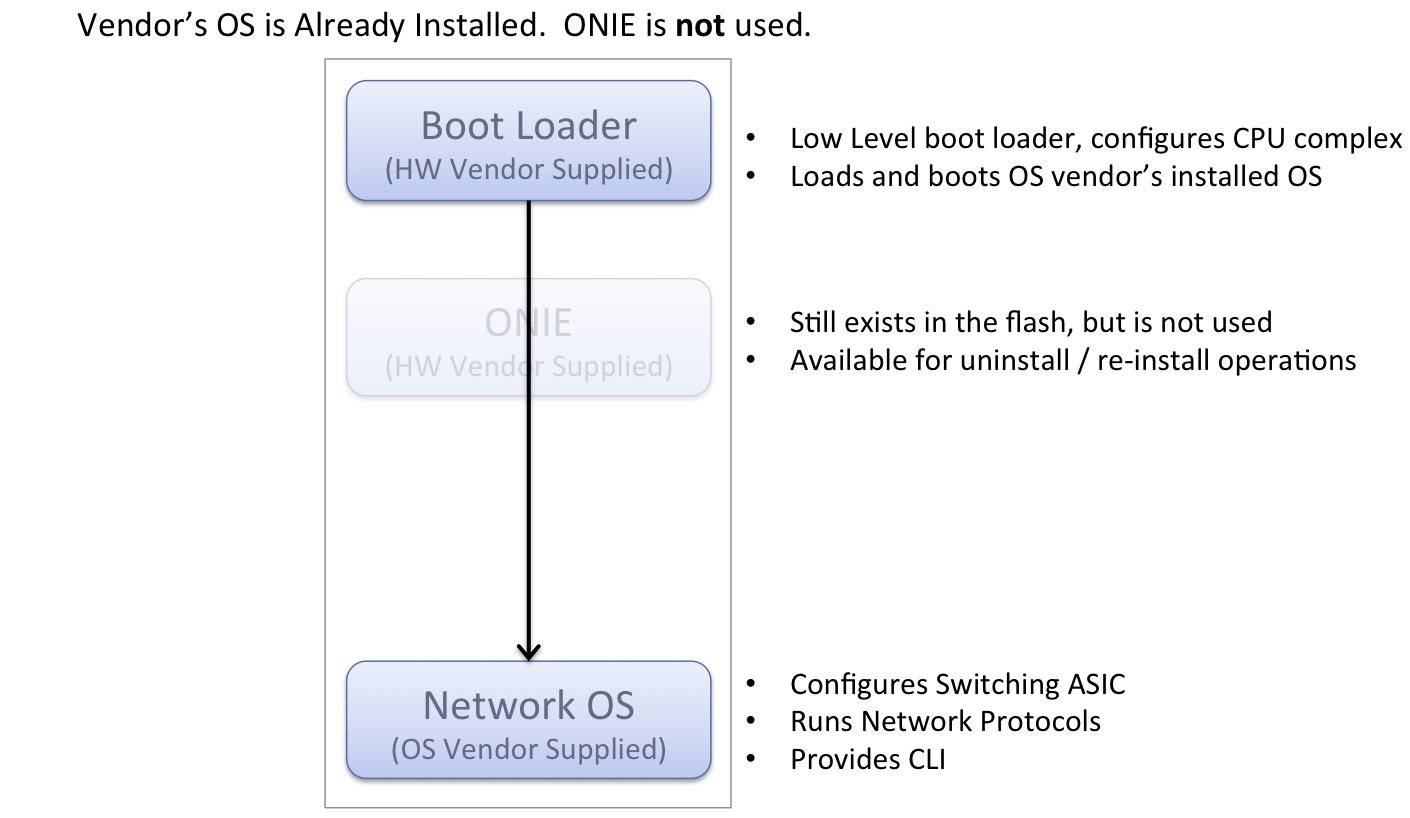
Subsequent Boots – After the NOS Is Installed
Mechanisms exist for a system to re-enter the installation phase. An API is defined so that network operating systems can direct the system to re-enter the installation phase.
Locating an Installer Image
ONIE uses a number of methods to locate the NOS installer, including, but not limited to:
Statically configured from the boot loader
Locally attached storage, for example a USB memory stick
DHCPv4 / DHCPv6
IPv4 / IPv6 link local neighbors
mDNS / DNS-SD
PXE-like TFTP and HTTP waterfalls
The preferred method for image download is HTTP as it offers robust performance for large image sizes. TFTP is also supported, but its use is discouraged in favor of HTTP.
Once an image is located, ONIE proceeds to execute the NOS installer.
The following diagram illustrates an example of the location and execution steps:

Image Discovery Methods
In the previous diagram the “Less Exact Methods” box refers to mechanisms that use probing techniques to locate an image, such as:
IPv4 / IPv6 link local neighbors
PXE-like TFTP and HTTP waterfalls
Installer Execution Environment
When executing the installer, ONIE exports a number of environment variables for the installer to use. These variables include system identification information as well as information learned during the image discovery process.
An example of the information exported to the installer includes:
Installer URL
HW vendor identifier
HW platform identifier
HW serial number
Ethernet management MAC address
IP address (from DHCP)
Hostname (from DHCP)
These variables allow an installer to integrate with other process automation and orchestration, immediately tying together product serial numbers, MAC addresses and NOS versions.
Installer Overview
The installer’s responsibility is to persistently install the operating system into the hardware. In fulfilling that role an ONIE-compliant NOS installer has a lot of flexibility.
Some examples of what an installer could do:
Fetch additional binaries and configuration files via HTTP
Chat with inventory control systems via HTTP
Download a new kernel+initramfs and
kexec(8)into it
Network Operating System Interface
ONIE provides an environment for the NOS to perform system provisioning and maintenance operations, including:
Reinstalling a different NOS
Uninstalling/wiping the system clean
Rescue and recovery
Updating ONIE
Updating the machine CPLD/FPGAs and BIOS firmware
This environment forms an interface between ONIE and the NOS.
Updating ONIE
ONIE provides a mechanism for updating itself. This mechanism proceeds much like the network installer discovery and executing phase, but the image in this case is an ONIE update image. Once located, the ONIE update image is downloaded and executed.
Firmware Updates
ONIE provides a mechanism for updating the firmware of the machine. In this context, firmware refers to software like CPLD/FPGA code and BIOS firmware. This mechanism proceeds much like updating ONIE itself, except the image in this case is ONIE firmware update image. Once located, the ONIE update image is downloaded and executed.